
Fixing rotated PDFs before they become bad text to speech audio
By Yuvraj Motiramani and Chandradeep Chowdhury · June 11, 2026
The core problem
Around 5% of all PDFs submitted to Paper2Audio are scanned documents. Around 5% of those scans are rotated, with pages 90, 180, or 270 degrees off from upright.
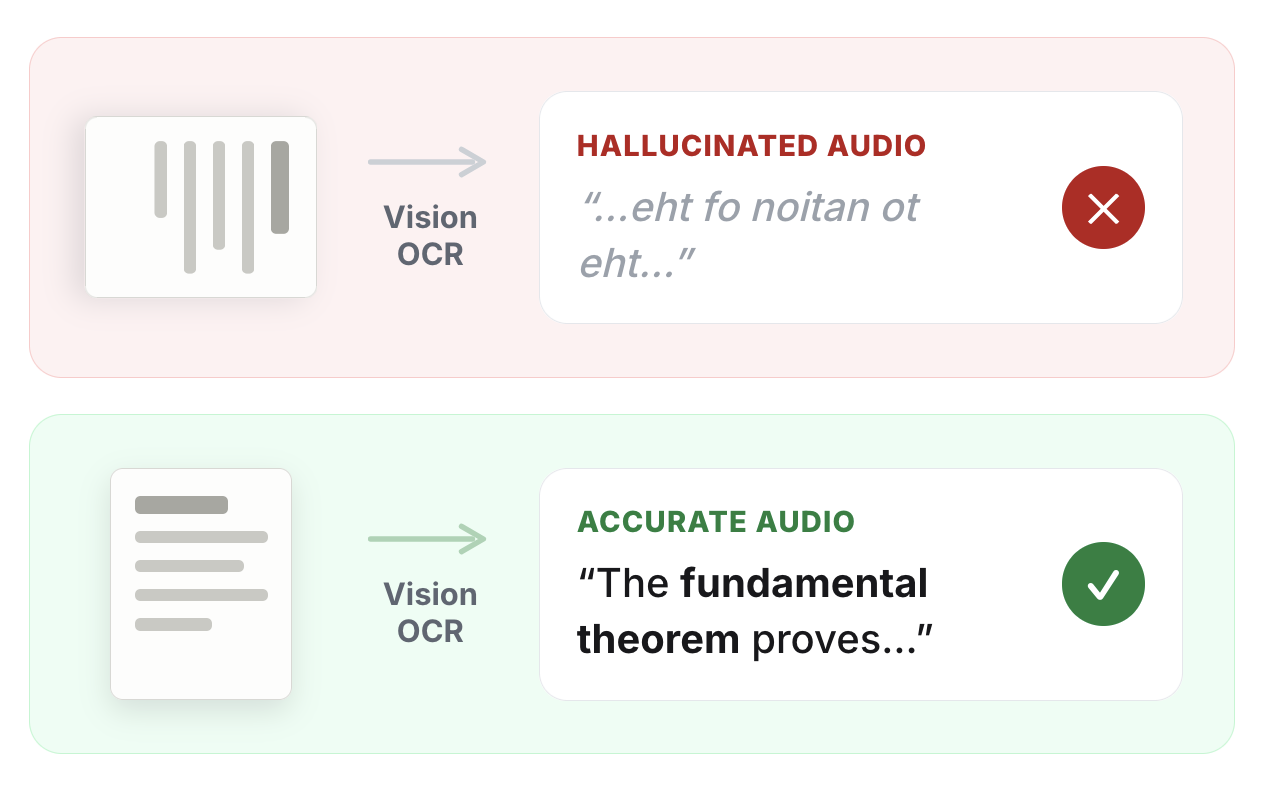
The first major step of the Paper2Audio document processing pipeline is to use a vision OCR model to extract the text, reading order, figures, and structure. These models are accurate on upright pages but unreliable on rotated ones, which produces two failure modes:
The model hallucinates: A rotated page, especially one that is poorly scanned, is hard to read for humans and even harder for these models. Rather than failing cleanly, these models tend to hallucinate the text, which then turns into garbled audio. For a TTS app like Paper2Audio, this is an unacceptable outcome.
The model returns unusable coordinates: Our OCR pipeline uses bounding boxes (bboxes) to identify text and visual regions before extracting their contents. Some OCR systems try to correct rotation internally, but on poor scans that step is not always reliable. Even when the text extraction partially works, the boxes can still point to locations on the sideways page, not the corrected upright page. That breaks our reading-order cleanup, which depends on knowing what is above, below, left, and right on the actual page.
As a result of these failure modes, we needed a way to make sure we always pass in upright PDFs to the OCR model.
What makes this hard
Correcting rotation is conceptually easy but doing it cheaply and reliably within a production pipeline's latency budget was not easy at all.
We first tried to run the rotation detection and correction on our main server. The detection step rasterizes pages and runs image processing over them, which causes serious memory inflation on the main server: a few large, high-resolution scans processed together balloons memory usage and would cause our main server to crash and interrupt other tasks.
So we moved the correction work to a serverless backend. It spins up on demand, runs the image-heavy OCR in an isolated environment with its own GPU, and returns a corrected PDF.
However there was still a remaining problem. Our correction service is comprehensive, but adds noticeable processing time. It rasterizes every page, runs OCR at multiple candidate orientations, scores each, and rewrites the rotation per page. Routing every PDF through this service would add tens of seconds to nearly every document submission to fix a problem only a fraction of uploads have.
We then decided that we needed a “gate:” a fast, cheap check that runs on every document and answers one question, is at least one page rotated? If the answer is no, we skip the correction service entirely.
The gate
The gate we built is a small vision LLM check, which fits into our initial document processing step. This step already determines the document’s language to reject unsupported documents before running our expensive vision OCR step. To run this language check, we were already rasterizing pages to images. We realized that we could use the same images for the page rotation gate.
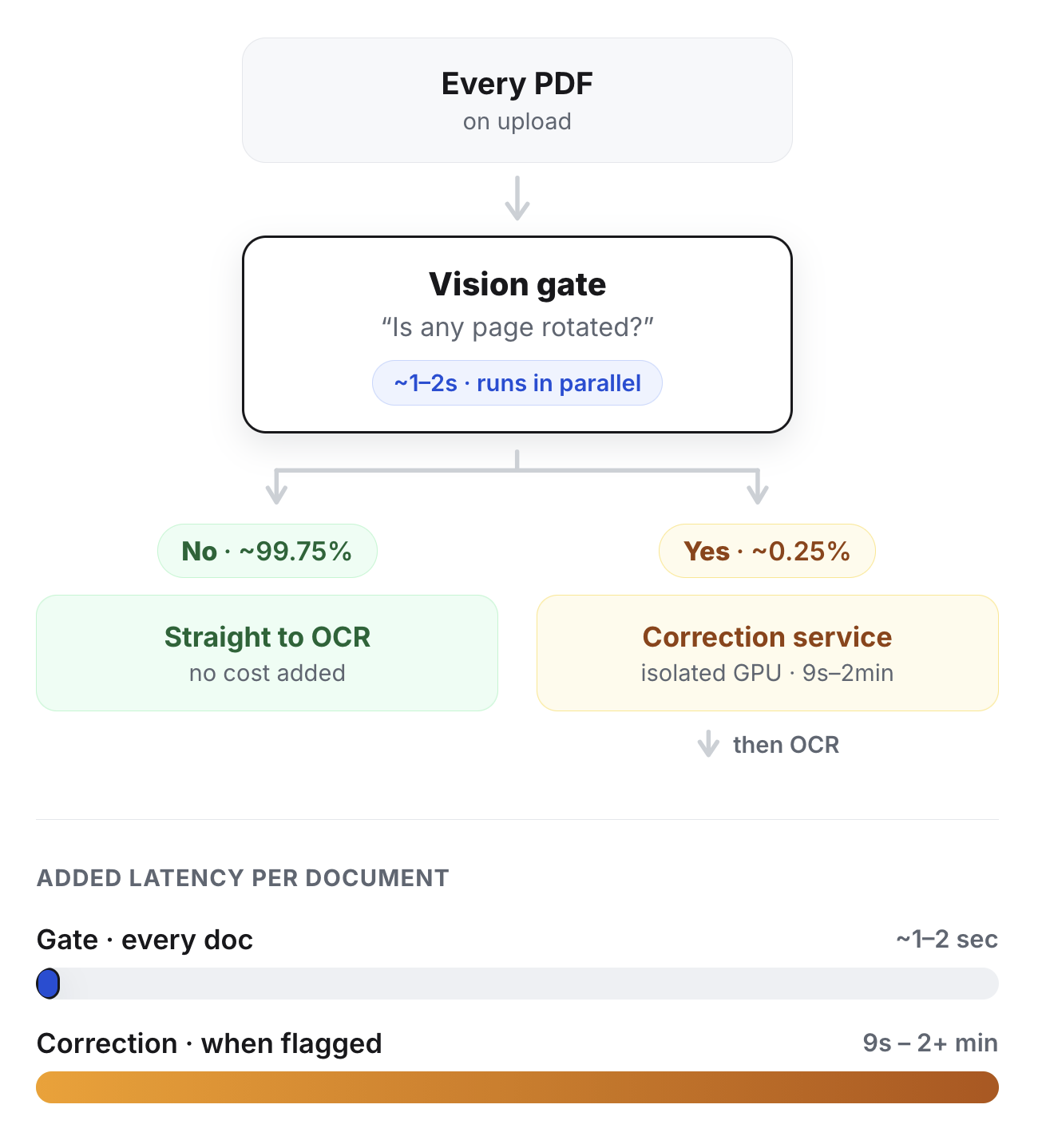
To check for page rotation, we sample up to five random pages, send them to a small, fast vision model and ask a structured question: are these pages rotated, and by how much? The model returns a boolean plus an estimated angle. Asking for the angle makes the classification more concrete at low cost and low added latency; the model has to decide not just whether the page is rotated, but whether it appears to be 90, 180, or 270 degrees off. We run this in parallel with language detection on the same images, so the gate adds very little time. If any sampled page is rotated, we send the full PDF to the correction service before text extraction. If it is not rotated, the PDF goes straight to the vision OCR model.
Sampling five pages instead of all of them is deliberate. In our data, rotation is almost always a property of the whole scan. If the document was scanned sideways, every page is sideways. A handful of random pages is enough to detect it, and it keeps the call payload small and response fast. The gate we developed only adds roughly 1 to 2 seconds to document processing time.
The correction service
When our gate flags a document as containing rotated pages, the full PDF goes to the model correction service. We correct the file page by page, since rotation can vary between pages.
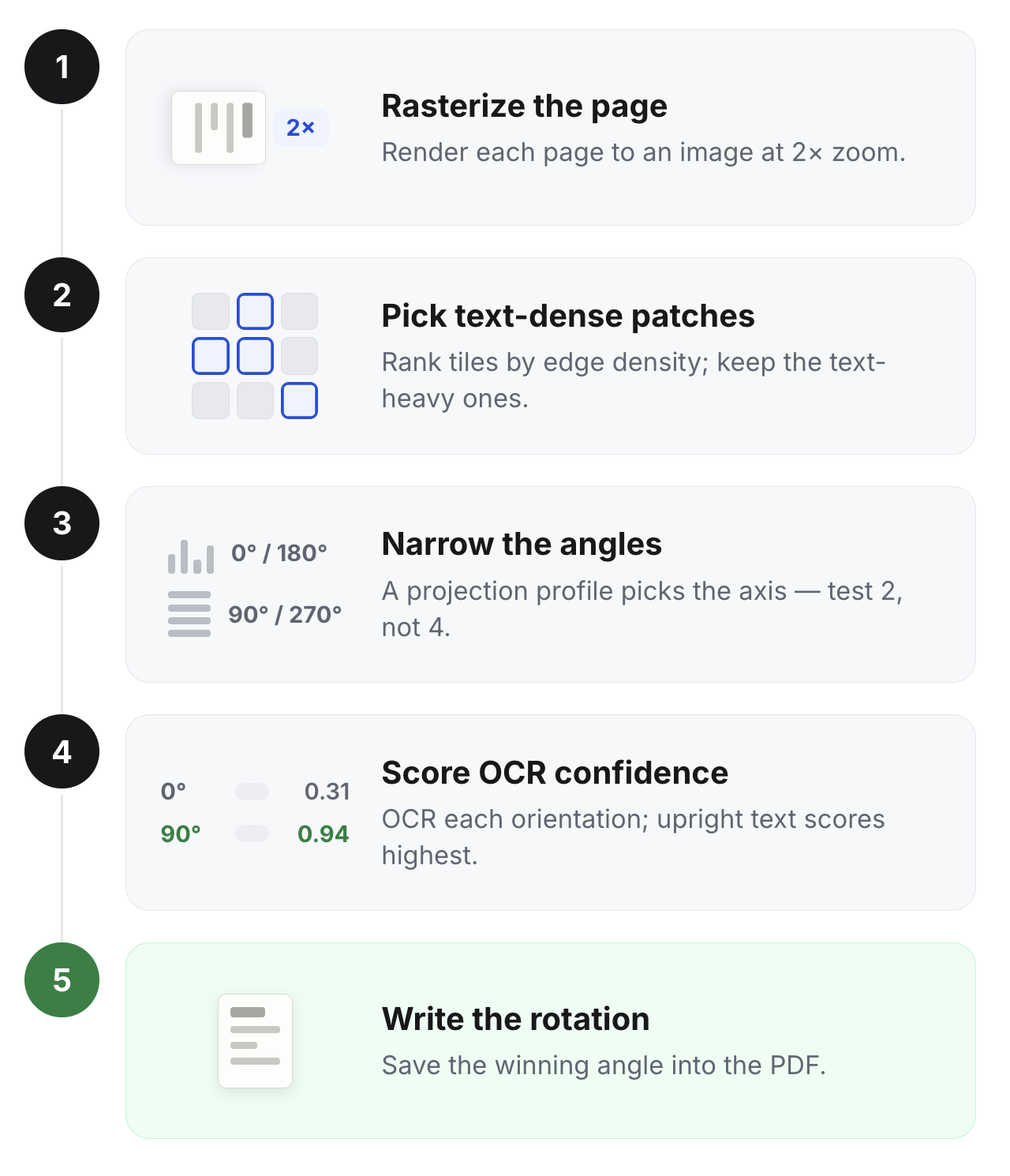
For each page, the process is:
Turn the page into an image: Rasterize it with PyMuPDF at 2x zoom to increase visual detail.
Focus on the parts most likely to contain text: Instead of running OCR on the entire page in every possible orientation, we split the page into tiles and look for the densest ones. Text-heavy areas usually have lots of edges, so we use Canny edge density to find patches that are likely to contain useful text.
Reduce the number of rotations to test: A quick projection-profile check tells us whether the text lines appear mostly horizontal or vertical. That usually narrows the page down to either a “0 or 180 degrees” case or a “90 or 270 degrees” case, so we only need to test two orientations instead of four.
Use OCR to choose the correct orientation: For each candidate orientation, we sharpen the patch, run EasyOCR, and score the result based on OCR confidence. Text produces higher confidence scores when it is upright and lower scores when it is sideways or upside down, so the highest-scoring orientation is usually the right one.
Correct the PDF: Write the winning rotation into the PDF with set_rotation if it is non-zero. If a page fails to process, we leave it unchanged rather than guessing and potentially making the document worse.
We chose EasyOCR for this process over other OCR libraries because the confidence values in its output are very reliable for this specific task. A lot of other libraries and models have unreliable confidence values in their outputs, or are better solutions for reading text across orientations, but that is not what we wanted here.
The output is the same PDF with corrected upright pages. By the time the document reaches the vision OCR model, the pages that needed correction have been rewritten into the expected upright orientation.
The result and what we learned
Since implementing this system, about 1,759 documents have been detected as rotated and corrected, from 947 distinct users. Nearly a thousand people uploaded a scan that could otherwise have produced hallucinated or garbled audio and instead got a clean conversion. Those corrected documents processed successfully 97.8% of the time, essentially the same rate as every other document. The average corrected document length was about 25 pages, the kind of long scan you would only discover was broken after starting to listen.
Our first lesson is that document-to-audio quality depends on much more than just the text to speech model. Document processing needs to distinguish ordinary inputs from messy edge cases as early as possible. Many tools assume they are starting from clean, digital text, but real user documents include scans, photocopies, and pages saved in the wrong orientation. A fast rotation check lets us keep normal documents moving quickly while still catching the cases that would otherwise fail badly.
The second lesson is that our new correction system is only useful in production because it has a gate in front of it. The full service is intentionally thorough, but it is too slow and compute-heavy to run on every document. Most uploads are already upright, so the important design choice was not just building a better correction pipeline; it was deciding when that pipeline should run.